Gradle vs Maven: Ultimate Build Automation Comparison
Last Updated on September 11, 2026
Choosing between Gradle vs Maven is one of the most critical architecture decisions for any Java or JVM-based project. While both are mature, open-source build automation systems, they take radically different paths toward solving the same problem: compiling code, managing dependencies, running test suites, and delivering production-ready artifacts.
- Apache Maven prioritizes convention over configuration, strict declarative rules, and predictable lifecycle phases.
- Gradle prioritizes developer productivity, raw execution speed, and flexible programmatic configuration using Kotlin or Groovy DSLs.
Below is an engineering-focused evaluation of Gradle vs Maven to help your team pick the right tool.
Table of Contents
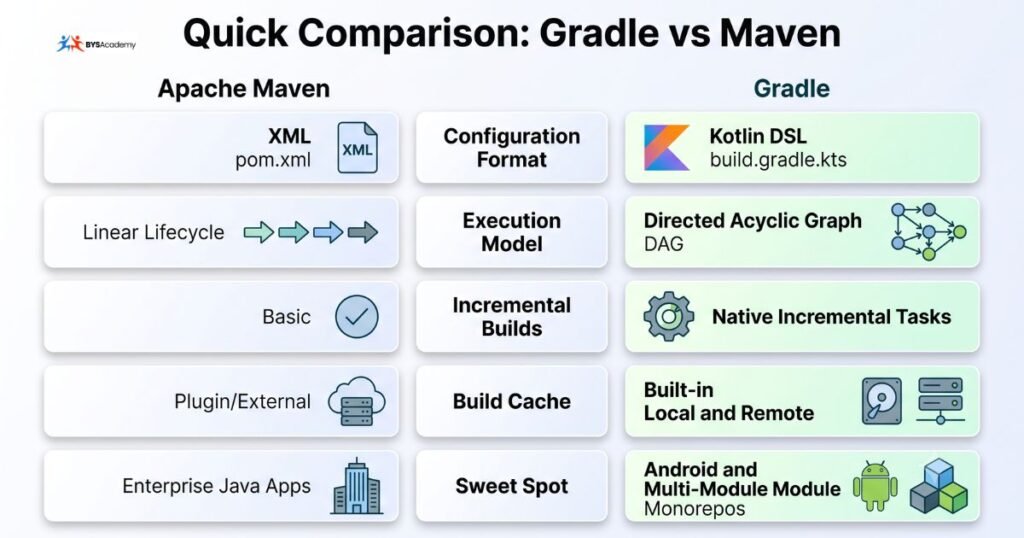
Quick Comparison: Gradle vs Maven at a Glance
Gradle vs. Maven: Key Differences
While both tools are used for automating build processes, they differ in several ways. Here are the key differences between Gradle and Maven:
Configuration & Syntax: Verbose XML vs. Modern DSL
A primary differentiator in the Gradle vs Maven debate is how build scripts are authored and maintained.
Maven’s Declarative XML
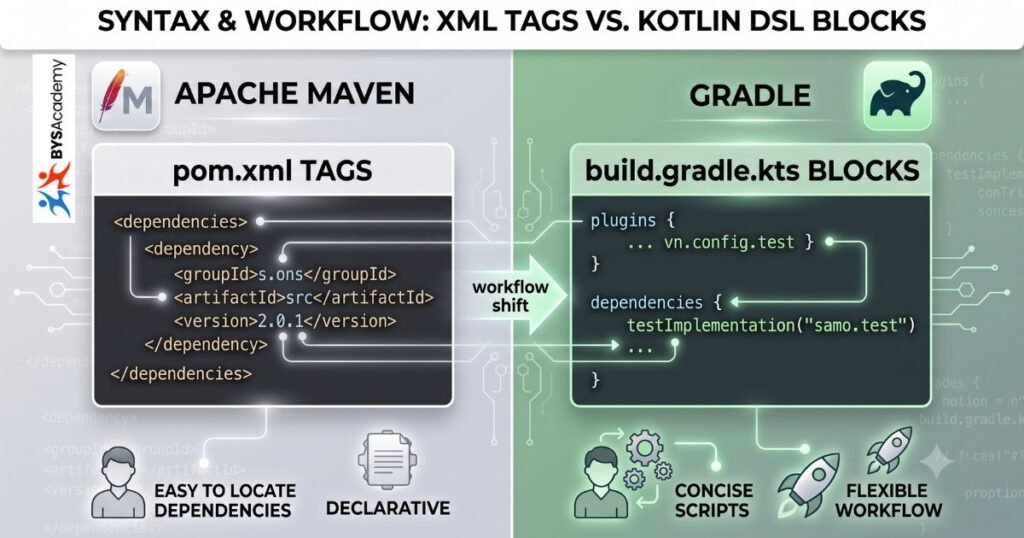
Maven uses a static pom.xml file. Every step and dependency is defined declaratively. This makes Maven builds easy to inspect, but configuration files can grow quickly and become verbose.
<!-- Modern Maven pom.xml (Java 21 + JUnit 5) -->
<project xmlns="http://maven.apache.org/POM/4.0.0"
         xmlns:xsi="http://www.w3.org/2001/XMLSchema-instance"
         xsi:schemaLocation="http://maven.apache.org/POM/4.0.0 https://maven.apache.org/xsd/maven-4.0.0.xsd">
    <modelVersion>4.0.0</modelVersion>
    <groupId>com.example</groupId>
    <artifactId>demo-service</artifactId>
    <version>1.0.0</version>

    <properties>
        <maven.compiler.release>21</maven.compiler.release>
        <junit.jupiter.version>5.10.2</junit.jupiter.version>
    </properties>

    <dependencies>
        <dependency>
            <groupId>org.junit.jupiter</groupId>
            <artifactId>junit-jupiter</artifactId>
            <version>${junit.jupiter.version}</version>
            <scope>test</scope>
        </dependency>
    </dependencies>
</project>Gradle’s Type-Safe Kotlin DSL
Gradle replaces XML with readable domain-specific scripts. Today, Kotlin DSL (build.gradle.kts) is the recommended standard, delivering compile-time type safety, context-aware auto-completion, and concise dependency declarations.
// Modern Gradle build.gradle.kts (Java 21 + JUnit 5)
plugins {
    java
}

group = "com.example"
version = "1.0.0"

java {
    toolchain {
        languageVersion.set(JavaLanguageVersion.of(21))
    }
}

repositories {
    mavenCentral()
}

dependencies {
    testImplementation(platform("org.junit:junit-bom:5.10.2"))
    testImplementation("org.junit.jupiter:junit-jupiter")
}

tasks.test {
    useJUnitPlatform()
}Takeaway: Maven makes it easy for any engineer to locate dependencies instantly without knowing code logic. Gradle provides concise scripts and programmatic flexibility, though unrestrained script logic requires discipline to maintain.
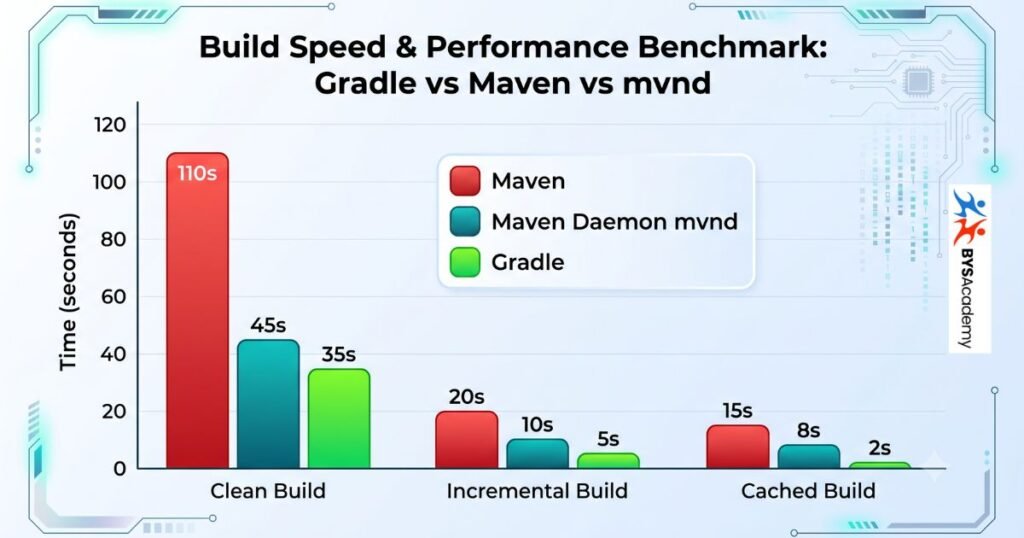
Build Speed & Performance: Incremental Builds & Caching
Performance is often the deciding factor when teams benchmark Gradle vs Maven. When comparing clean full builds, Maven and Gradle exhibit comparable runtimes. However, during real-world day-to-day development involving code changes and rebuilds, Gradle operates significantly faster.
Execution Model Comparison:

Maven (Linear Phases):
[validate] ➔ [compile] ➔ [test] ➔ [package] ➔ [verify]
• Re-evaluates and runs predefined phases sequentially.

Gradle (DAG Task Graph + Cache Engine):
:compileJava (UP-TO-DATE ➔ Skipped)
:processResources (NO-SOURCE)
:test (Cached ➔ Output restored from cache)
• Uses Directed Acyclic Graph; only dirty or changed tasks execute.Why Gradle Outperforms Maven in Daily Workflows
- Intelligent Work Avoidance: Gradle tracks cryptographic checksums of task inputs and outputs. If nothing changed, the task is marked
UP-TO-DATEand skipped.
- The Gradle Daemon: A background daemon process preserves in-memory compilation caches and JIT optimizations across build invocations.
- Local & Remote Build Cache: Tasks completed by another engineer or a CI runner can be fetched from a shared remote cache, eliminating duplicate compiles.
Can Maven Match This Speed?
Maven has narrowed the performance delta through:
- Multi-threaded Builds: Running
mvn -T 1C clean packageallocates one thread per CPU core.
- Maven Daemon (
mvnd): An official tool embedding daemon mechanics and GraalVM to approach Gradle-like execution speeds.
Dependency Management & Conflict Resolution
Both tools interface seamlessly with Maven Central and custom artifact repositories, but their conflict resolution strategies differ.
Conflict Resolution Mechanisms
- Maven (“Nearest Definition Wins”): Maven picks the dependency version that sits closest to the root project in the dependency tree. If an older version is discovered higher in the tree hierarchy, Maven adopts it—which can cause unexpected runtime
NoSuchMethodErrorexceptions unless manually pinned via<dependencyManagement>.
- Gradle (“Newest Compatible Version Wins”): Gradle constructs an end-to-end dependency graph and defaults to the newest version found among conflicting transitive dependencies.
Inspecting Your Dependency Tree
In Maven:
mvn dependency:tree -Dincludes=org.springframeworkIn Gradle:
./gradlew dependencies --configuration runtimeClasspathMulti-Module Project Scalability
Enterprise systems rely on modular codebases. Managing these modules presents different workflows in each tool:
- Maven Multi-Module Projects: Managed via a parent
pom.xmlusing<modules>tags. Every sub-module inherits properties and versions hierarchically. It is predictable, easy for CI to parse, and standardized.
- Gradle Multi-Project & Composite Builds: Coordinated via
settings.gradle.kts. Beyond basic subprojects, Gradle supports composite builds, letting you include an external Git project locally to test cross-repo changes without deploying snapshot artifacts.
Decision Matrix: When to Choose Gradle vs Maven
Choose Apache Maven If:
- Your application is a standard Spring Boot or Jakarta EE microservice.
- Your engineering team values a standardized project structure with zero build configuration surprises.
- You need strict corporate guardrails preventing team members from introducing arbitrary code into build files.
Choose Gradle If:
- You are building Android applications (Gradle is Google’s official build tool).
- You maintain a large multi-module monorepo where incremental compilation saves substantial engineering hours.
- You use Kotlin Multiplatform or need deep custom pipeline integration.
Frequently Asked Questions
-
Which is faster: Gradle or Maven?
Gradle is noticeably faster for incremental builds and rebuilds after small code edits due to its built-in daemon, task input hashing, and build cache. For fresh clean builds on single-module projects, Maven and Gradle offer similar runtimes.
-
Is Gradle replacing Maven?
No. Maven remains widely used in enterprise Java and traditional enterprise backends. Gradle dominates in Android and Kotlin development, but Maven continues to be maintained and supported across modern Java releases.
-
Can Gradle use Maven repositories?
Yes. Gradle connects to Maven Central, Google Maven, and private repositories like Sonatype Nexus or JFrog Artifactory using simple repository declarations such as
mavenCentral().
Conclusion
Ultimately, the Gradle vs Maven decision comes down to your project type and team priorities: Maven’s predictable, XML-driven lifecycle suits standardized enterprise Java projects, while Gradle’s speed and flexibility make it the default choice for Android, Kotlin, and large multi-module codebases. If you’re just getting started with Gradle, our Gradle Tutorial for Beginners walks through setup and your first build step by step.

You may also like